Dead Protocol Walking
- 5 Sept 2026
- Blog
- 27 min
- Networking · Red team · Hardware
Bridging a 2004 PSP to the modern web through an intentional TLS downgrade proxy. Solving connectivity does not solve compatibility.
The Sony PSP is a handheld console released in 2004. Its built-in web browser, based on the NetFront engine, shipped with support for SSL 2.0, SSL 3.0, and TLS 1.0. In 2026 none of those protocols are accepted by any major web server. The major public HTTPS services tested in this project require TLS 1.2 or newer, and the cipher suites the PSP supports were deprecated or outright prohibited years ago.
This project builds a compatibility proxy that sits between the PSP and the internet. The PSP sends plain HTTP requests to the proxy. The proxy upgrades those requests to modern HTTPS, fetches the content from the real server, adapts the HTML for the PSP browser, and sends the result back over HTTP. The PSP receives content it could never have reached on its own.
The security consequence of this architecture is that the connection between the PSP and the proxy is unencrypted. Any data the PSP transmits, including form submissions and credentials, travels in plaintext. This is demonstrated using a controlled test page and confirmed using Wireshark packet capture.
The project also shows that even with the TLS problem solved, the PSP browser can only render a fraction of modern web content. Solving connectivity does not solve compatibility. The gap between what the proxy can reach and what NetFront can display is substantial, and closing it fully would require engineering effort well beyond the scope of a simple proxy.
The Sony PSP and its networking stack
1.1 Background
Sony released the PlayStation Portable in Japan in December 2004 and in North America in March 2005. At the time it was a technically impressive device. It had a 333 MHz MIPS processor, 32 MB of RAM, a 480 x 272 pixel widescreen display, and built-in 802.11b wireless networking. For a handheld console in 2005 this was competitive hardware.
The PSP was not designed as an internet device first, but Sony recognised the opportunity to give it a web browser. Firmware 2.00, released in mid-2005, added the browser as a free update. At the time, a portable device with a real web browser was notable. The browser was usable enough for basic tasks in an era when most websites were still static HTML pages. That was over twenty years ago. The internet has changed almost completely since then.
1.2 Wireless networking limitations
The PSP supports 802.11b only, which operates on the 2.4 GHz band at a maximum of 11 Mbps. Bandwidth is not the main issue for basic web browsing. The real problem is wireless security.
The PSP natively supports WEP and WPA-TKIP. WEP was broken by researchers in 2001 and should not be used on any network. WPA-TKIP was deprecated by the Wi-Fi Alliance in 2012 and is considered insecure. Modern access points do not offer either option by default.
In order to connect this PSP to a modern WPA2 network, the firmware had to be modified using ARK-4, a custom firmware that adds WPA2 support through a plugin not present in stock firmware. Without this modification the PSP cannot connect to a modern access point at all. It cannot even reach the stage of attempting a web request.
1.3 SSL and TLS support
Understanding the PSP TLS situation requires separating what the official documentation claims, what firmware updates may have changed, and what modern servers actually accept.
1.3.1 Original SSL stack at firmware 2.00
When the browser shipped with firmware 2.00, the NetFront documentation listed support for SSL 2.0, SSL 3.0, and TLS 1.0. The root certificate store included VeriSign, Entrust, Thawte, Betrusted, GeoTrust, SECOM, and Trust.net. These were appropriate for the web of 2005.
SSL 3.0 defines the following cipher suites, among others. These represent the full specification, not necessarily every suite the PSP implements:
SSL_RSA_WITH_RC4_128_MD5SSL_RSA_WITH_RC4_128_SHASSL_RSA_WITH_3DES_EDE_CBC_SHASSL_RSA_WITH_DES_CBC_SHA- Various export-grade RC4, RC2, and DES suites
- DHE-RSA and DHE-DSS variants
The actual suites offered by the PSP depend on what NetFront included in its Client Hello. What is clear is that RC4 and 3DES formed the backbone of PSP TLS, with MD5 and SHA-1 as the hash functions.
1.3.2 TLS 1.0 and firmware 6.61
Some sources report that firmware 6.61 added or improved TLS 1.0 support. This is not confirmed in any official Sony documentation. The psp-archive.github.io project notes the same uncertainty: the end effect is the same regardless, because TLS 1.0 with the PSP cipher suites is not accepted by modern servers. TLS 1.0 was deprecated by major browsers in 2020.
1.3.3 ARK-4 and root certificate updates
ARK-4 adds WPA2 support and also opens the door to certificate store updates. A GitHub issue raised against the ARK-4 repository in early 2025 specifically requested that new root certificates be added, noting that WPA2 support made HTTPS access worth attempting again.
Even with updated root certificates, the PSP TLS stack remains the limiting factor. A new root certificate allows the PSP to validate a modern certificate chain. It does not add TLS 1.2 or TLS 1.3 cipher suite support. The handshake still fails because the PSP cannot offer any cipher suite a modern server will accept. The proxy is still required for any site running a current TLS configuration.
1.3.4 Why modern servers reject the PSP
TLS 1.3, introduced in 2018, removed every cipher suite the PSP supports. It supports only AES-128-GCM-SHA256, AES-256-GCM-SHA384, and ChaCha20-Poly1305-SHA256. RC4 is prohibited by RFC 7465. 3DES is prohibited by RFC 8996. MD5 is unsuitable for modern certificate signatures, while SHA-1 has been deprecated for publicly trusted TLS certificates. RSA key exchange without forward secrecy is absent from TLS 1.3 entirely.
A server running TLS 1.3 will not negotiate with a client offering only these algorithms. The handshake fails before any application data is exchanged. This is why the PSP cannot reach any modern HTTPS website directly, regardless of whether the certificate chain would validate.
The NetFront browser
2.1 What NetFront was
The PSP browser is a version of NetFront, developed by Access Co. Ltd. NetFront was a significant browser in the embedded and mobile space during the late 1990s and early 2000s, designed to run on devices with limited memory and processing power including mobile phones, PDAs, set-top boxes, and handheld consoles.
At the time of the PSP release, NetFront was well-regarded for what it was. It shipped on many devices beyond the PSP, including Sony Ericsson phones, Amazon Kindle e-readers, Nintendo Wii, and various Sony televisions. For a period it was one of the most widely deployed embedded browsers in the world. It was built for the web of 2005.
2.2 Technical capabilities at release
- HTML 4.01 — structural elements, tables, forms, basic embedding.
- Basic CSS — box model, colours, fonts, simple positioning, limited float support. CSS2 at best, and partially at that.
- Basic JavaScript — form validation, simple DOM manipulation. No modern APIs, no ES6, no async.
- HTTP 1.1, cookies, and session state.
- Image formats: GIF, animated GIF, JPEG, PNG, BMP.
- Three rendering modes: Normal, Just-Fit, and Smart-Fit for different screen layouts.
The browser has a 480 x 272 pixel viewport. Smart-Fit mode attempts to reflow content to fit the width, which works for simple text pages but breaks complex layouts.
2.3 Why NetFront cannot handle the modern web
HTML5 introduced semantic elements, native video and audio, canvas, SVG, and large structural changes. NetFront understands none of these. Modern web design depends on CSS features that did not exist in 2005: Flexbox standardised in 2012, CSS Grid in 2017, CSS custom properties, transitions, and animations throughout the 2010s. NetFront does not support any of them.
The biggest problem is JavaScript. The modern web has shifted to applications where JavaScript generates all visible content. React, Vue, Angular, and similar frameworks build the page in the browser. NetFront has a JavaScript engine but it supports only a very old version of the language. ES6, introduced in 2015, added classes, arrow functions, template literals, and many features NetFront cannot parse. Modern framework code will not run at all.
Single page applications send a minimal HTML shell from the server. JavaScript is supposed to build the rest. NetFront receives the empty shell, cannot execute the JavaScript, and displays nothing.
The compatibility proxy
3.1 The problem
The PSP cannot reach modern HTTPS websites for two independent reasons. The first is TLS: its cipher suites are rejected by modern servers before any content is exchanged. The second is rendering: even if content were delivered, NetFront cannot display most of it. A compatibility proxy addresses the first problem directly and the second problem partially.
3.2 Architecture
The proxy runs on a workstation on the same local network as the PSP. The PSP is configured to route all web traffic through it. The proxy accepts plain HTTP from the PSP, establishes a modern HTTPS connection to the real destination, retrieves the content, adapts it for NetFront, and returns it over HTTP.
PSP ── HTTP ──▶ Proxy ── HTTPS ──▶ WebsiteThe two connections are completely separate. The PSP only ever speaks HTTP. The proxy handles TLS using a modern Python HTTP client with full certificate validation. The PSP never participates in the TLS handshake.
This is the fundamental security consequence of the architecture: the PSP-to-proxy segment is unencrypted. Anything the PSP sends or receives, including form data and credentials, is visible in plaintext on the local network.
3.3 The legacy adapter
HTML pages retrieved from modern websites are processed before being sent to the PSP. The adapter:
- Removes all script tags. JavaScript will not run reliably on NetFront and modern framework code produces a blank page.
- Removes iframes, video, audio, canvas, and SVG elements.
- Removes external stylesheet links referencing modern CSS files.
- Rewrites all HTTPS URLs in
href,src, andactionattributes to HTTP so that every link continues routing through the proxy. - Injects a minimal legacy-compatible stylesheet with basic font and image size constraints.
Without the URL rewriting, every link on a retrieved page would point to HTTPS. The PSP would attempt to connect directly, fail at the TLS handshake, and show an error. Rewriting keeps every subsequent request inside the proxy.
3.4 What the proxy does not solve
The proxy solves the TLS layer. It does not solve the rendering layer. Content delivered through the proxy is limited to what NetFront can process, which is essentially HTML 4.01 with minimal CSS. The result is functional text but with little to no visual design.
To provide a genuinely usable modern web experience through the PSP, the proxy would need to render the full page using a headless modern browser, then convert the rendered output into simplified HTML targeting NetFront specifically. This is architecturally closer to a thin client model than a simple proxy, and would require understanding NetFront rendering behaviour at a level that is not publicly documented. NetFront is proprietary and its source is not available.
The proxy built here demonstrates the TLS downgrade and shows that simple HTTPS sites are reachable. It is not a viable general-purpose browsing solution.
Testing and results
4.1 Experimental methodology
Testing was performed using a PSP running firmware 6.61 with ARK-4 and WPA2 connectivity enabled. The PSP and proxy workstation were connected to the same local network, with the PSP configured to use the proxy on port 8888. The proxy was implemented in Python using requests and BeautifulSoup.
Each target website was first accessed directly from a modern browser to establish that the destination was available over HTTPS. The same URL was then requested through the PSP proxy. Successful retrieval was defined as the PSP receiving an HTTP response and rendering readable content in NetFront. Packet captures were performed using Wireshark to compare a modern HTTPS submission with an equivalent PSP submission through the proxy.
4.2 Site selection and TLS compatibility
Sites were chosen based on HTML complexity, HTTPS requirements, and research value. JavaScript-heavy applications were excluded because rendering failure there is a NetFront limitation, not a TLS problem. The table below documents TLS support for all sites tested. TLS versions were verified empirically during testing.
| Website | URL | TLS 1.2 | TLS 1.3 | Min. TLS |
|---|---|---|---|---|
| CNN Lite | lite.cnn.com | Yes | Yes | 1.2 |
| NPR Text | text.npr.org | Yes | Yes | 1.2 |
| Human Rights Watch | hrw.org | Yes | Yes | 1.2 |
| Hacker News | news.ycombinator.com | Yes | Yes | 1.2 |
| GNU FTP | ftp.gnu.org | Yes | Yes | 1.2 |
| Lobsters | lobste.rs | Yes | Yes | 1.2 |
| Skimfeed | skimfeed.com | Yes | Yes | 1.2 |
| WUKY Text | wuky.org/text | Yes | Yes | 1.2 |
| CBC Lite | cbc.ca/lite/news | Yes | Yes | 1.2 |
| RFC Editor | rfc-editor.org | Yes | Yes | 1.2 |
| Basic Website Example | basicwebsiteexample.com/static-website-example | Yes | Yes | 1.2 |
| Wikipedia Mobile | en.m.wikipedia.org/wiki/Main_Page | Yes | Yes | 1.2 |
| Test Login Page | maw1z.github.io/legacy-psp-browser-bridge/ | Yes | Yes | 1.2 |
Table 4.1 — TLS support across sites tested. All sites require TLS 1.2 minimum. The PSP cannot reach any of these without the proxy.
4.3 CNN Lite, NPR Text, CBC Lite
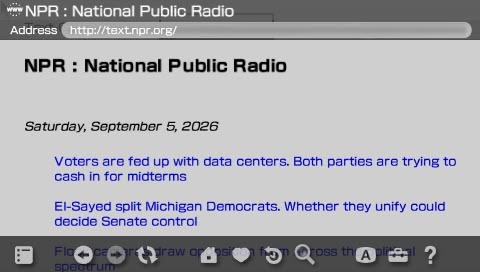
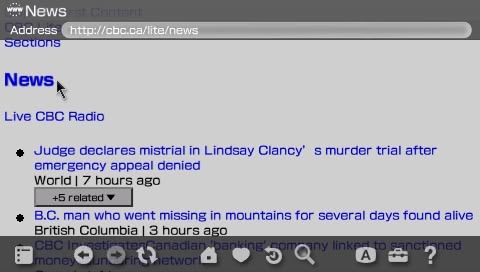
These are text-only versions of major news outlets, originally built for users on slow or metered connections. They remain actively maintained and are genuinely useful today for exactly that purpose. CNN Lite strips out all video, advertising, and interactive elements and serves plain article text. NPR Text does the same for audio-first content, presenting transcripts and articles in clean HTML. CBC Lite covers Canadian news with a similarly stripped-down approach. All three are usable for reading current news in 2026 without a smartphone or a modern browser. Through the proxy, all three load on the PSP with text content intact. The articles are readable. The absence of styling after the adapter strips the external CSS is noticeable but does not affect comprehension. For someone who wants news headlines and article text, these sites work.

4.4 Human Rights Watch
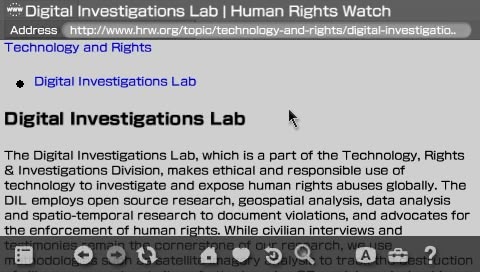
Human Rights Watch is one of the most prominent international human rights organisations in the world. Its website publishes reports, investigations, and news covering conflicts, government abuses, and civil liberties across over ninety countries. The site runs on modern HTTPS and would be completely unreachable on the PSP without the proxy. Through the proxy the article text loads and is readable. The site uses more CSS than the lite news sites, so layout breaks more noticeably after the adapter strips the stylesheet, but the substance of the content is there. It is a meaningful real-world test case because it represents the kind of information a user might genuinely need access to, on a device or in a context where a modern browser is not available.
4.5 GNU FTP
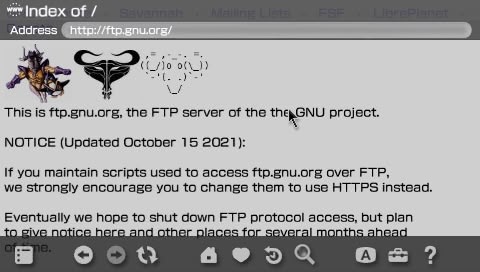
The GNU FTP server at ftp.gnu.org is one of the longest-running public file repositories on the internet. It hosts the official source tarballs for the GNU project, including GCC, Glibc, Bash, Make, and hundreds of other foundational Unix tools. The index is served as a plain directory listing over HTTPS — no JavaScript, no CSS, no dynamic content. Just a structured list of files and folders rendered as HTML. It has looked essentially the same since the early days of the web and continues to serve the same purpose today. Through the proxy the directory listing loads on the PSP without any issues. There is nothing for the adapter to strip and nothing for NetFront to fail on. It is the cleanest possible rendering result in the entire test set. It also makes a useful point: some of the most important infrastructure on the internet is still served as plain HTML, and a twenty-year-old browser can read it just fine once the TLS barrier is removed.
4.6 Hacker News, Lobsters and Skimfeed
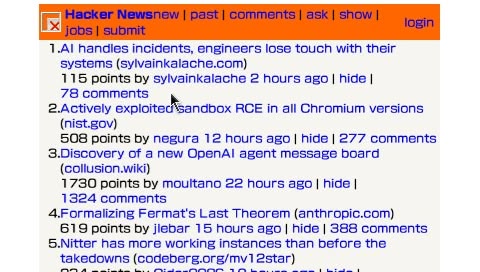
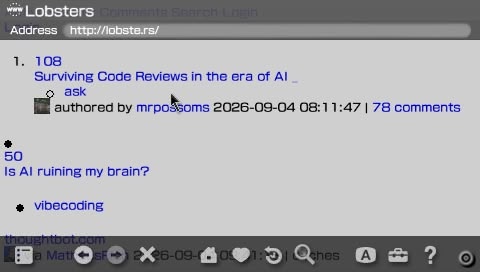
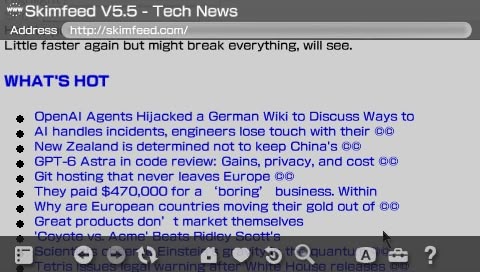
Hacker News is a technology and startup news aggregator run by Y Combinator. Lobsters is a similar community-driven link aggregator focused on computing and software. Skimfeed is a lightweight news aggregator that pulls headlines from major tech and general news sources into a single minimal page. All three sites are notable for deliberately stripped-down HTML. Hacker News in particular has not meaningfully changed its front-end in over a decade and is one of the most HTML-4-compatible sites on the modern internet by active design choice. Skimfeed was built with simplicity as a feature rather than a constraint, serving dense headline lists with almost no styling overhead. All three are genuinely useful for keeping up with technology news, developer discussions, and security topics without needing a modern browser. The comment threads on Hacker News are often more informative than the linked articles. Through the proxy all three load with essentially all content intact. The lack of styling is not a problem because there was almost no styling to begin with.
4.7 WUKY Text
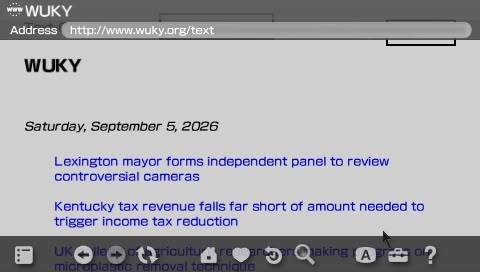
WUKY is a public radio station based at the University of Kentucky. Its text site strips the audio-first experience down to plain HTML articles and news summaries, making it accessible on any device that can render basic HTML. It is a useful example of public broadcasting that remains readable without JavaScript or modern CSS. The content covers local, national, and international news and is updated regularly. Through the proxy the page loads cleanly on the PSP with all article text intact. It is one of the quieter finds in the test set but demonstrates that the proxy works equally well for smaller, less well-known HTTPS sites as it does for major outlets.
4.8 RFC Editor
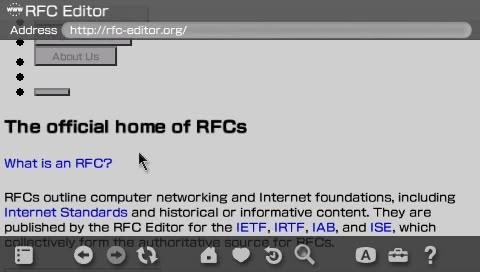
The RFC Editor serves the official archive of internet standards documents over modern HTTPS. Every RFC ever published is available as plain HTML: readable, structured, and text-first by design. The site is genuinely useful — RFC 7465 on the prohibition of RC4, RFC 8996 on the deprecation of 3DES, and RFC 8446 defining TLS 1.3 are all directly relevant to this project and all accessible through the proxy. The site serves mostly static HTML with minimal CSS and has not needed JavaScript to function since it was first published. It is practically designed for the kind of simple rendering NetFront provides, which makes it one of the few modern HTTPS sites where the PSP experience is close to adequate.
Without the proxy the PSP TLS handshake fails. With the proxy, the page loads and the text content is fully readable.
4.9 Wikipedia Mobile
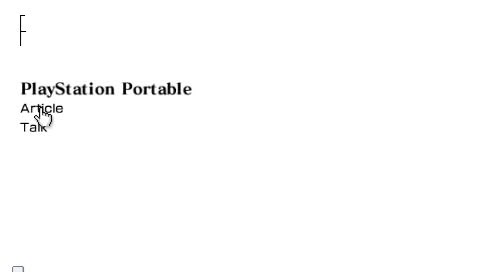
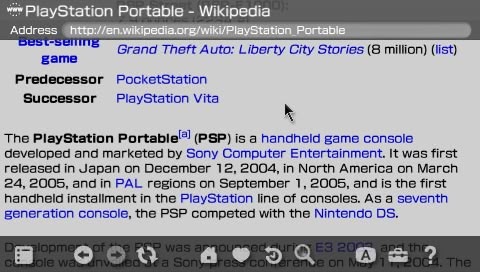
Wikipedia is the largest reference work ever created and one of the most visited websites in the world. The mobile version at en.m.wikipedia.org was specifically built for constrained clients with limited bandwidth and processing power. It remains actively maintained and is the go-to reference for virtually any topic. Through the proxy the content is accessible: article text, section headings, and internal links all load. Wikipedia mobile is usable on the PSP in the same way a printed encyclopedia is usable — the information is there even if the presentation is stripped back. For a device with no other way to reach the modern web this is meaningful.
Before URL rewriting was implemented, clicking any article link produced a 501 error because the PSP attempted to open HTTPS directly. Once the legacy adapter added URL rewriting, article links routed correctly through the proxy.
4.10 The test login page
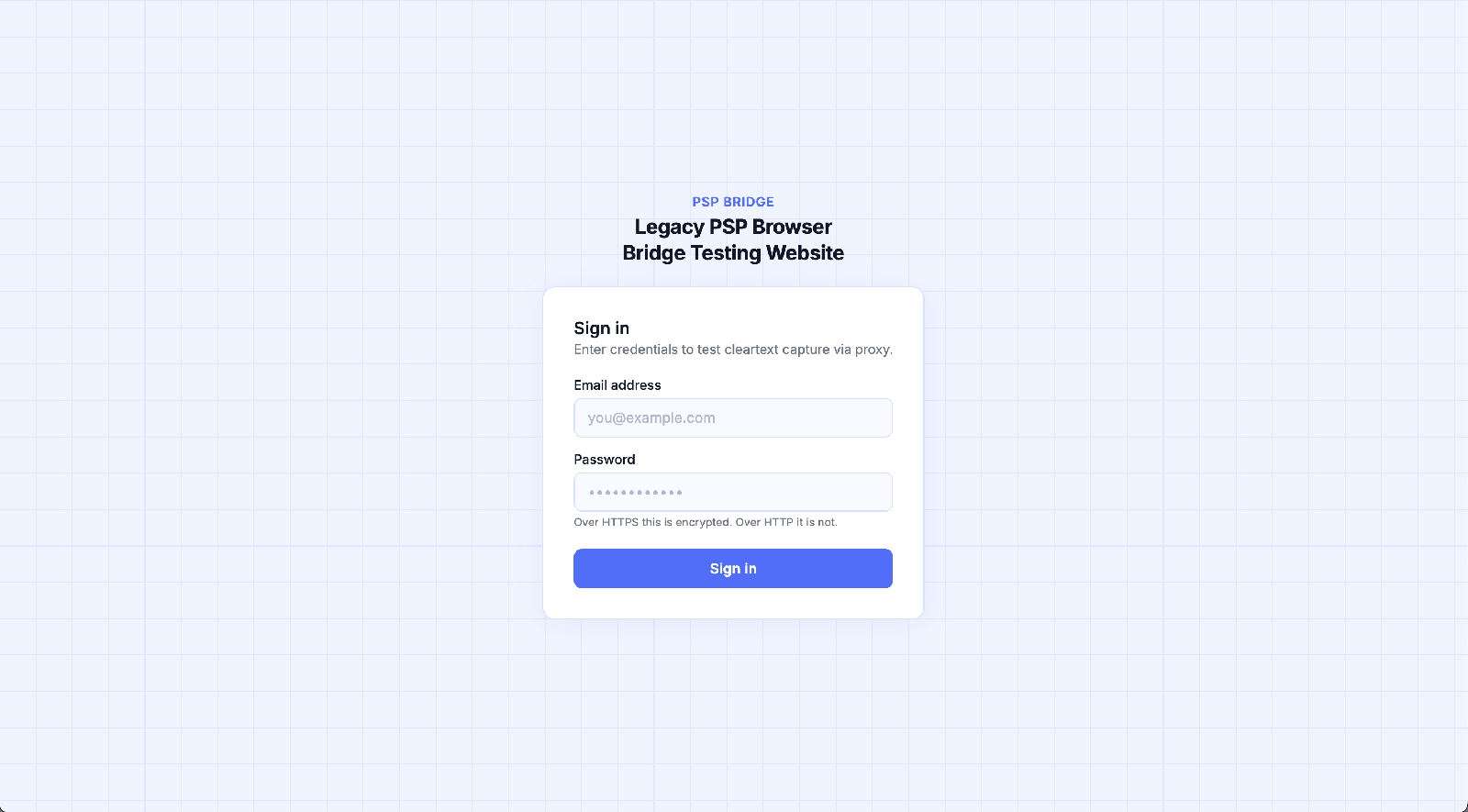
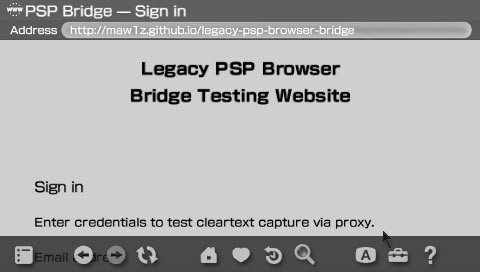
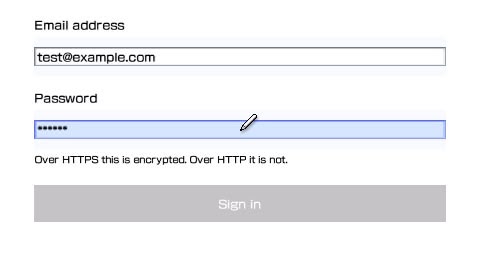
A dedicated test page was deployed to GitHub Pages at a public HTTPS URL. GitHub Pages serves all content over HTTPS only. A direct connection from the PSP fails at TLS. Through the proxy the page loads.
4.11 Credential capture
When the form is submitted through the proxy, the POST request travels from the PSP to the proxy over plain HTTP. The proxy logs the request body before forwarding it.

The credentials are fully visible. No decryption is required because there is no encryption on the PSP-to-proxy segment.
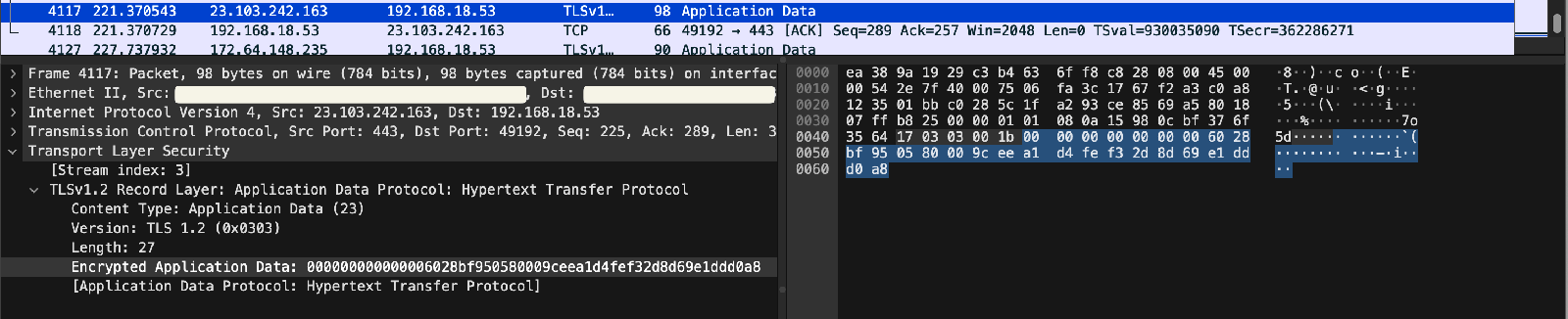
For comparison, the same form submitted in a modern browser over HTTPS shows only encrypted TLS Application Data records in Wireshark. The content is not readable without the session keys.

Security analysis
5.1 What HTTPS provides
HTTPS combines HTTP with TLS. TLS provides three security properties:
- Confidentiality: content is encrypted. An observer can see that a connection exists and approximately how much data transferred, but cannot read the content.
- Integrity: content cannot be modified in transit without detection. A changed byte causes the integrity check to fail and the connection drops.
- Authentication: the server proves its identity using a certificate signed by a trusted certificate authority. The client can verify it is talking to the real server.
Modern HTTPS uses TLS 1.3, which supports only forward-secure key exchange and authenticated encryption. AES-GCM and ChaCha20-Poly1305 are the cipher suites. RC4, 3DES, MD5, and RSA key exchange are absent entirely.
5.2 What the proxy architecture does to HTTPS
The proxy terminates TLS. When it connects to a website it establishes a genuine TLS 1.3 connection with full certificate validation. That connection is secure between the proxy and the server.
The connection between the PSP and the proxy is plain HTTP. All three security properties are absent on that segment:
- Confidentiality is lost. Any device on the local network can read traffic between the PSP and the proxy.
- Integrity is lost. An attacker on the local network could modify HTML or form data in transit without detection.
- Authentication is lost from the PSP perspective. The PSP cannot verify the identity of any server. It trusts whatever the proxy returns.
The proxy becomes a trust boundary. Security from the proxy to the internet is preserved. Security from the PSP to the proxy is not.
5.3 Comparison with SSL stripping
The network topology of this project is identical to an SSL stripping attack:
SSL stripping:  Victim  ── HTTP ──▶  Attacker  ── HTTPS ──▶  Server
This project:   PSP     ── HTTP ──▶  Proxy     ── HTTPS ──▶  Server
In SSL stripping the victim is a capable modern client that would normally use HTTPS. The attacker deliberately prevents the upgrade. The victim does not know an intermediary is present. In this project the PSP is a legacy client that cannot use modern HTTPS under any circumstances. The proxy is intentional, trusted, and configured deliberately. The security consequence on the unencrypted segment is the same in both cases.
Alternative approaches
This project is one approach to the PSP browsing problem. The community has explored others.
6.1 PSPKVM and Opera Mini 8
PSPKVM is a Java virtual machine for the PSP. Installing it allows the PSP to run Java ME applications, including Opera Mini 8. Opera Mini uses a server-side rendering model: it sends the requested URL to Opera servers, which fetch and render the page server-side and return a compressed binary format that the app displays locally. The heavy work is done on modern server infrastructure.
This means Opera Mini 8 on PSP can access a wider range of sites than NetFront directly. Rendering quality is limited by what Opera Mini converts, but it is substantially better than what NetFront produces from raw HTML.
6.2 ESP32-based hardware proxy
MagHeater, a contributor discussed on the PSP subreddit, built a hardware-based approach using an ESP32 microcontroller. The project, PSP-Meshtastic, uses the ESP32 as a Meshtastic web client designed specifically for legacy devices including the PSP, Nintendo DS, and iPod Touch. It converts HTTPS to HTTP at the hardware level, serving simplified content to the legacy client without requiring a separate workstation running proxy software. The project is available at github.com/MagHeater/PSP-Meshtastic.
6.3 What a full solution would require
A genuinely usable modern web experience on the PSP would require a server-side rendering pipeline that fetches the target URL using a full headless modern browser engine, renders the page completely including all JavaScript execution, captures the rendered output, and converts it to simplified HTML that NetFront can display. This is closer to what Opera Mini does, but targeted specifically at NetFront rendering capabilities.
Targeting NetFront specifically would require knowing exactly what CSS, HTML, and JavaScript constructs it accepts. NetFront is proprietary and its source is not public. The reverse engineering effort required to build a reliable NetFront-targeted renderer would be substantial. The proxy in this project does none of this. It is a demonstration tool, not a browsing solution.
Room for improvement
The proxy built in this project is functional but minimal. There is meaningful room for improvement at both the adapter layer and the TLS handling layer.
7.1 Legacy adapter improvements
The current adapter takes a blunt approach: remove everything that might cause problems and inject a minimal stylesheet. A more careful adapter could target NetFront more precisely.
NetFront supports a subset of CSS2 that includes basic box model properties. A better adapter would preserve CSS rules that NetFront can actually use rather than removing all external stylesheets entirely. For example, the following properties are within what NetFront can render:
font-family: sans-serif;
font-size: 14px;
color: #333;
background-color: #fff;
margin: 8px;
padding: 4px;
border: 1px solid #ccc;
width: 90%;
text-align: left;
display: block;
An adapter that selectively kept rules like these from the original stylesheet rather than discarding it entirely would produce significantly better rendering.
On the JavaScript side, NetFront can handle very basic scripts. Simple operations like form validation using getElementById, basic string operations, and alert() calls may work. An improved adapter could attempt to preserve script blocks that do not use modern syntax rather than removing all JavaScript unconditionally. Detecting ES6 syntax and stripping only those blocks would require parsing, but is achievable.
// ES5 - may run on NetFront
document.getElementById('email').value
window.alert('Please fill in all fields')

// ES6+ - will not run on NetFront, should be stripped
const validate = () => { ... }
const { email, password } = formData
fetch('/api/login').then(r => r.json())
None of this would make modern web applications work on NetFront. It would improve the rendering of older, simpler HTTPS sites that happen to use basic CSS and minimal JavaScript.
7.2 TLS and certificate handling
The proxy currently upgrades all HTTP requests to HTTPS by replacing the scheme. A more robust implementation would handle mixed-content pages more carefully, log certificate details for each upstream connection, and surface certificate validation errors in a format the PSP can display rather than returning a generic 502.
7.3 Caching
The proxy makes a fresh upstream request for every PSP request, including repeated requests for the same resource. Adding a simple in-memory or file-based cache for static resources would reduce load time noticeably on the PSP, which sends multiple requests for a single page as it fetches each linked resource sequentially.
Limitations
This project demonstrates a targeted concept and achieves it cleanly, but a number of limitations should be understood before drawing broader conclusions from the results.
- No end-to-end encryption. The PSP to proxy segment is plain HTTP with no way around it given the PSP TLS stack. Anyone on the same local network can read all traffic without any decryption. This is a fundamental property of the architecture, not something that can be fixed without upgrading the cryptographic algorithms the PSP supports.
- Incomplete HTTP proxy implementation. The proxy handles GET and POST requests, which covers basic web browsing. It does not implement CONNECT tunnelling, keep-alive connections, or less common HTTP methods. It is sufficient for the demonstration but would need additional work to function as a general-purpose proxy.
- Modern JavaScript applications remain unusable. Removing script tags prevents NetFront from crashing on incompatible code but does not make the content accessible. Any site where visible content is generated by JavaScript will return a blank or near-blank page regardless of what the adapter does. This is a NetFront limitation and cannot be addressed without a server-side rendering pipeline.
- CSS adaptation is intentionally simplistic. The adapter removes all external stylesheets and injects a minimal fallback. NetFront supports a subset of CSS2 and a more sophisticated adapter could selectively keep compatible rules, which would produce better results on some sites. The current approach was kept simple to avoid introducing parsing errors.
- Limited site coverage. Thirteen sites were tested, all chosen for low JavaScript dependency. They are not a representative sample of the modern web and the sites that work are a specific subset built with simplicity or accessibility in mind.
- Results are firmware and configuration specific. Testing was performed on a specific PSP model running ARK-4 custom firmware. Different models, firmware versions, and regional variants may behave differently around SSL negotiation and certificate handling.
- No performance benchmarking. No measurements were taken of request latency or page load time. The PSP is noticeably slow loading pages through the proxy but no systematic data was collected, which was outside the scope of this project.
Conclusion
The PSP is a device frozen in 2004, operating on a network that has moved on completely. Its SSL stack predates the deprecation of RC4, the prohibition of 3DES, the retirement of SHA-1 certificate hashing, and the introduction of forward secrecy as a baseline requirement. Its browser predates HTML5, CSS3, JavaScript frameworks, and the shift from document-oriented pages to client-side applications. Connecting it to the modern web requires solving two problems that are entirely separate: the TLS layer, and the rendering layer. This project solved the first and exposed the limits of the second. By running a lightweight Python proxy on a workstation on the same local network, the PSP was able to reach thirteen modern HTTPS sites that its TLS stack would have rejected outright. The proxy negotiates TLS 1.3 on the upstream side and returns content over plain HTTP on the downstream side. That single architectural decision is enough to make a twenty-year-old device retrievable from the modern internet, and it is also the decision that strips every security property HTTPS was designed to provide on the segment between the PSP and the proxy. Credentials submitted through the PSP travel in plaintext which can be confirmed through Wireshark capture. The topology is indistinguishable from an SSL stripping attack except in who controls the intermediary and whether the client knows it is there.
What this project also demonstrates is that reachability and usability are not the same thing. Of the thirteen sites tested, the ones that rendered acceptably on the PSP were the ones that were designed with constraints in mind: text-first news sites, link aggregators, static documentation. Sites that depend on CSS Grid, Flexbox, custom properties, or JavaScript frameworks produced either unstyled text or nothing at all. NetFront was an excellent browser in 2005. It is not a browser for the web that exists today, and no amount of proxy engineering changes that. Making the PSP genuinely usable for modern browsing would require a server-side rendering pipeline that executes JavaScript, applies modern CSS, and converts the result into something NetFront can display. That is a substantially larger project, and it would require detailed knowledge of NetFront rendering behaviour that is not publicly available. The proxy built here is honest about what it is: a demonstration of TLS downgrade mechanics and the security consequences that follow, using a legacy device that makes the architecture unusually clear. The PSP cannot pretend it supports modern TLS. The proxy cannot pretend it is not breaking the encrypted connection. Both limitations are features, not bugs, for a project whose purpose is to show exactly what happens when the encryption ends.
References
- Access Co., Ltd. (2005) ACCESS NetFront Browser Brings Internet Browsing to PSP. Available at: https://www.access-company.com/en/news_event/archives/2005/20050906/ (Accessed: 5 September 2026).
- Internet Engineering Task Force (2015) Prohibiting RC4 Cipher Suites, RFC 7465. Available at: https://www.rfc-editor.org/rfc/rfc7465 (Accessed: 5 September 2026).
- Internet Engineering Task Force (2015) Deprecating Secure Sockets Layer Version 3.0, RFC 7568. Available at: https://www.rfc-editor.org/rfc/rfc7568 (Accessed: 5 September 2026).
- Internet Engineering Task Force (2018) The Transport Layer Security (TLS) Protocol Version 1.3, RFC 8446. Available at: https://www.rfc-editor.org/rfc/rfc8446 (Accessed: 5 September 2026).
- Internet Engineering Task Force (2019) Deprecating TLSv1.0 and TLSv1.1, RFC 8996. Available at: https://www.rfc-editor.org/rfc/rfc8996 (Accessed: 5 September 2026).
- MagHeater (2025) PSP-Meshtastic: ESP32-based web client for legacy devices. Available at: https://github.com/MagHeater/PSP-Meshtastic (Accessed: 5 September 2026).
- Mawiz (2026) Legacy PSP Browser Bridge. Available at: https://github.com/Maw1z/Legacy-PSP-Browser-Bridge (Accessed: 5 September 2026).
- PSP-Archive (2024) ARK-4 Changelog, GitHub. Available at: https://github.com/PSP-Archive/ARK-4/blob/main/CHANGELOG.md (Accessed: 5 September 2026).
- Reddit (2025) I finally got internet somewhat working on my PSP, r/PSP. Available at: https://www.reddit.com/r/PSP/comments/1ufcpvq/i_finally_got_internet_somewhat_working_on_my_psp/ (Accessed: 5 September 2026).
- RFC Editor (no date) RFC Editor. Available at: https://www.rfc-editor.org (Accessed: 5 September 2026).
- Sony Computer Entertainment Inc. (2004) Sony Computer Entertainment Inc. Announces Product Specifications of Handheld Video Game System, PlayStation Portable. Available at: https://sonyinteractive.com/en/press-releases/2004/sony-computer-entertainment-inc-announces-product-specifications-of-handheld-video-game-system-playstationportable-psp/ (Accessed: 5 September 2026).
- Wikipedia (no date) NetFront. Available at: https://en.wikipedia.org/wiki/NetFront (Accessed: 5 September 2026).
- Wikipedia (no date) Temporal Key Integrity Protocol. Available at: https://en.wikipedia.org/wiki/Temporal_Key_Integrity_Protocol (Accessed: 5 September 2026).
Appendix A: proxy.py
Main proxy server. Accepts HTTP from the PSP, upgrades to HTTPS upstream, logs intercepted POST bodies, applies legacy HTML adaptation to HTML responses.
from http.server import HTTPServer, BaseHTTPRequestHandler
import requests
from legacy_adapter import transform_html

PORT = 8888

class ProxyHandler(BaseHTTPRequestHandler):
    def do_GET(self):
        target = self.path
        print(f"[PROXY] GET {target}")
        try:
            if target.startswith("http://"):
                upstream_url = target.replace("http://", "https://", 1)
            else:
                upstream_url = target

            response = requests.get(
                upstream_url,
                headers={
                    "User-Agent": "Mozilla/5.0 Legacy PSP Browser Bridge/1.0",
                    "Accept": "text/html,application/xhtml+xml,*/*",
                },
                timeout=15,
                verify=True,
                allow_redirects=True
            )

            content_type = response.headers.get("Content-Type", "text/html")
            body = response.content

            if "text/html" in content_type:
                body = transform_html(body, response.url)

            self.send_response(response.status_code)
            self.send_header("Content-Type", content_type)
            self.send_header("Content-Length", str(len(body)))
            self.end_headers()
            self.wfile.write(body)

        except Exception as error:
            print(f"[ERROR] {error}")
            try:
                self.send_response(502)
                self.end_headers()
                self.wfile.write(b"Proxy error")
            except Exception:
                pass

    def do_POST(self):
        length = int(self.headers.get("Content-Length", 0))
        body = self.rfile.read(length)

        print(f"[INTERCEPT] POST {self.path}")
        print(f"[INTERCEPT] {body.decode('utf-8', errors='replace')}")

        target = self.path
        if target.startswith("http://"):
            upstream_url = target.replace("http://", "https://", 1)
        else:
            upstream_url = target

        try:
            response = requests.post(
                upstream_url,
                data=body,
                headers={
                    "User-Agent": "Mozilla/5.0 Legacy PSP Browser Bridge/1.0",
                    "Content-Type": self.headers.get(
                        "Content-Type", "application/x-www-form-urlencoded"),
                },
                timeout=15,
                verify=True,
                allow_redirects=True
            )

            content_type = response.headers.get("Content-Type", "text/html")
            resp_body = response.content

            if "text/html" in content_type:
                resp_body = transform_html(resp_body, response.url)

            self.send_response(response.status_code)
            self.send_header("Content-Type", content_type)
            self.send_header("Content-Length", str(len(resp_body)))
            self.end_headers()
            self.wfile.write(resp_body)

        except Exception as error:
            print(f"[ERROR] {error}")
            try:
                self.send_response(502)
                self.end_headers()
                self.wfile.write(b"Proxy error")
            except Exception:
                pass

    def log_message(self, format, *args):
        pass

def main():
    server = HTTPServer(("0.0.0.0", PORT), ProxyHandler)
    print(f"[PROXY] Listening on port {PORT}")
    server.serve_forever()

if __name__ == "__main__":
    main()
Appendix B: legacy_adapter.py
HTML transformation module. Strips modern elements, removes external stylesheets, rewrites HTTPS URLs to HTTP, injects a minimal legacy-compatible stylesheet.
from bs4 import BeautifulSoup
from urllib.parse import urljoin

def transform_html(html_bytes, base_url):
    soup = BeautifulSoup(html_bytes, "html.parser")

    for tag in soup.find_all([
        "script", "iframe", "video", "audio",
        "canvas", "svg", "noscript"
    ]):
        tag.decompose()

    for tag in soup.find_all("link", rel="stylesheet"):
        tag.decompose()

    for tag in soup.find_all("meta"):
        name = tag.get("name", "").lower()
        if name in ["viewport", "theme-color"]:
            tag.decompose()

    for tag in soup.find_all(True):
        for attr in ["href", "src", "action"]:
            value = tag.get(attr)
            if not value:
                continue
            absolute_url = urljoin(base_url, value)
            if absolute_url.startswith("https://"):
                tag[attr] = absolute_url.replace("https://", "http://", 1)
            elif absolute_url.startswith("http://"):
                tag[attr] = absolute_url

    style = soup.new_tag("style")
    style.string = """
        body { font-family: sans-serif; font-size: 14px; margin: 4px; }
        img { max-width: 450px; }
        a { color: #00f; }
    """

    if soup.head:
        soup.head.append(style)

    return str(soup).encode("utf-8", errors="replace")